Forecast-based purchasing planning: from forecast to purchase order
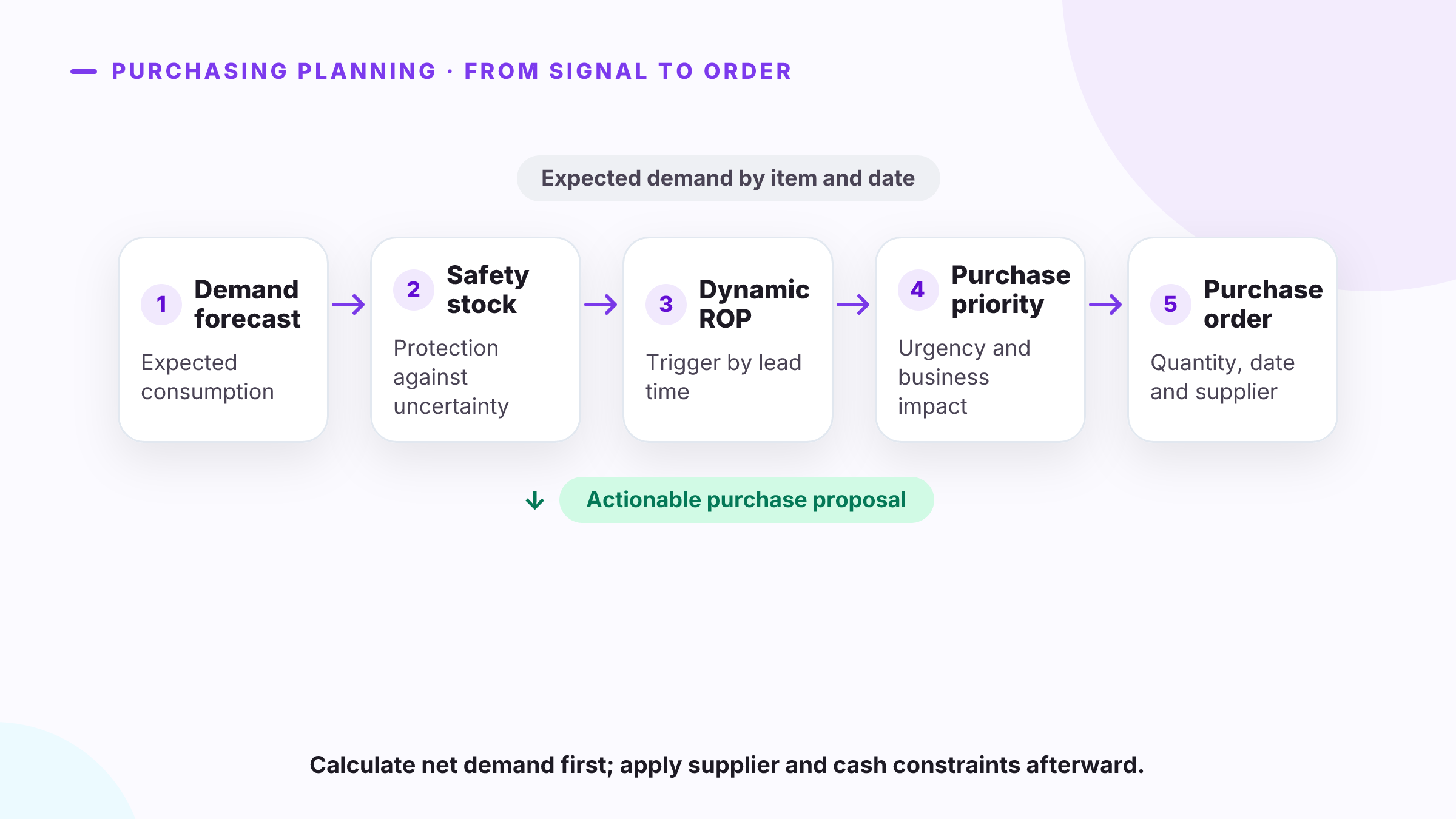
Purchasing planning turns forecast demand into concrete proposals: which SKU to buy, how much to order and when it must arrive. The basic flow is demand forecast → safety stock → reorder point → net requirement → purchasing priority → purchase order.
The forecast does not replace replenishment rules. It estimates future consumption; inventory and confirmed receipts are then netted, the service level is protected, and supplier constraints are applied. That separation matches the definition of planning from Hyndman and Athanasopoulos: a forecast describes what is likely to happen, while a plan defines what actions to take in response.
The minimum data for purchasing planning
A purchase suggestion is only traceable if it shows its inputs. At minimum, by SKU and location:
| Data | What it represents | Error it prevents |
|---|---|---|
| Forecast by period | Expected demand over the purchasing horizon. | Buying from an average that ignores trend, seasonality or promotions. |
| Usable inventory | Available stock after blocks, quality holds or reservations. | Counting units that cannot serve demand. |
| Committed demand | Orders, backorders and consumption already allocated. | Overstating the inventory position. |
| Confirmed receipts | Open orders with valid quantities and dates. | Duplicating a purchase already in transit. |
| Lead time | Time from order release to receipt. | Ordering the right quantity for a date that is too late. |
| Safety stock | Buffer tied to forecast error and lead-time variability. | Applying the same margin to every SKU. |
| Supplier rules | Minimum, multiple, maximum, calendar and approved supplier. | Proposing an order that cannot be executed. |
Safety stock should protect against variation not explained by the forecast and against supply delays. Peter King’s formula for APICS incorporates both demand variability and lead-time variability.
From forecast to suggested quantity
The reorder point answers when to begin replenishment. Purchasing planning still has to determine how much and for what date. Under a periodic-review policy, one calculation is:
Inventory position = usable inventory + confirmed receipts − committed demand
Target level = forecast demand over (lead time + review period) + safety stock
Suggested quantity = max(0, target level − inventory position)
This is not a universal formula. A make-to-order item, a production input and a high-volume SKU may require different policies. Planning systems support requirement, period and Min./Max. methods; under Min./Max., replenishment covers the difference between the configured maximum and projected inventory. Microsoft documents those differences and the subsequent application of purchase minimums, maximums and multiples.
Worked example
Suppose a SKU is reviewed weekly:
| Component | Value |
|---|---|
| Weekly forecast | 80 units |
| Lead time | 3 weeks |
| Review period | 1 week |
| Safety stock | 60 units |
| Usable inventory | 240 units |
| Confirmed receipts | 40 units |
| Committed demand | 20 units |
First, the dynamic ROP is 80 × 3 + 60 = 300 units. The inventory position is 240 + 40 − 20 = 260 units; it is already below the ROP, so replenishment should be reviewed.
The target level covering lead time and the next review is 80 × (3 + 1) + 60 = 380 units. The suggested quantity is 380 − 260 = 120 units. If the supplier sells in multiples of 25, the executable proposal rises to 125 units. That adjustment should remain visible: it comes from a purchasing condition, not from the forecast.
How to prioritize purchase proposals
A list sorted only by monetary value can hide operating risk. Priority should compare the date when projected inventory becomes insufficient with the earliest possible receipt date.
Review in this order:
- Stockout risk before the next receipt. The projected shortage date establishes urgency.
- Committed demand and service level. A confirmed order has a different consequence from demand that is still forecast.
- SKU importance. ABC/XYZ segmentation separates value from variability instead of applying one rule to the entire catalog.
- Lead time and supplier reliability. Two SKUs with the same coverage do not carry the same risk when one takes longer to replenish.
- Purchasing constraints. Minimums, multiples, shelf life, capacity and budget can change the quantity or require manual review.
The useful output is not an opaque “urgent” label. It is an explainable row: projected inventory, shortage date, possible receipt date, suggested quantity and priority reason.
From suggestion to purchase order
A supply plan must net demand against supply before creating orders. In Microsoft Business Central’s documentation, the system compares what is needed with what is available or expected and generates actions to create, change or cancel purchase, production or transfer orders. Dynamics 365 also lets forecasts enter the master plan to calculate requirements and generate planned orders by item and horizon.
Before releasing a proposal as a purchase order, validate:
- that no other open order covers the same requirement;
- supplier, purchase unit, conversion and currency;
- allowed minimum, multiple and maximum;
- requested date against current lead time;
- quantity, price and approved budget;
- separate status for suggested, planned, approved and sent.
Automation reduces repetitive work, but it does not remove purchasing controls. Its role is to give the buyer a reproducible proposal and keep exceptions visible.
Forecast Studio generates SKU-level forecasts and reorder points to prioritize purchasing requirements; through its API, those outputs can feed the ERP where suppliers, approvals and orders live. Suggestion quality depends first on forecast quality: persistent bias flows into inventory, ROP and requested quantities.
To review this flow with your catalog and lead times, book a demo.
Sources: Hyndman & Athanasopoulos, Forecasting: Principles and Practice — forecasting and planning · King, Crack the Code: Understanding safety stock, APICS Magazine · Microsoft, Inventory forecasts · Microsoft, Replenishment methods and quantity modification · Microsoft, Planning supplies automatically